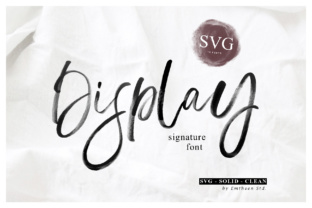
Display Signature: A Brush Script Font for Authentic Designs
Finding a font that feels truly personal in a digital world can be a challenge. Many script typefaces feel either too perfect or too rigid. Display Signature offers a different approach. This SVG font is crafted to replicate the genuine look of hand lettering created with a real brush. The result is a typeface with a natural, organic flow that carries the subtle imperfections and texture of actual ink on paper.
Understanding the SVG Difference
What sets Display Signature apart from standard fonts is its technology. As an OpenType-SVG color font, it preserves the high-resolution texture and nuanced details of the original brush strokes. This means the font isn't just a solid outline filled with color; it contains the actual brush-like texture within each glyph. You get the authentic, handcrafted appearance without needing to apply additional effects or textures manually.
It’s important to note this technical distinction for compatibility. Display Signature is designed to work seamlessly in applications that support OpenType-SVG fonts, such as Adobe Photoshop, Adobe Illustrator, Silhouette Studio, and Inkscape. This makes it a powerful tool for digital designers, crafters using cutting machines, and anyone working within these specific creative environments. However, for platforms like Cricut Design Space that require standard vector outlines, the OTF or TTF files of this particular product are not compatible.
Three Styles for Creative Flexibility
Versatility is built into the font's DNA. Display Signature is available in three distinct styles, each serving a different purpose in your design toolkit.
- SVG Style: This is the full, textured version. It delivers the most authentic brush lettering experience, complete with visible ink texture and natural color variation. Use it when the primary goal is to showcase a raw, handmade aesthetic.
- Solid Style: This version simplifies the design into a solid vector shape. It removes the intricate texture but retains the bold, fluid character of the brush strokes. It's excellent for projects where scalability or single-color printing is a priority, like screen printing or vinyl cutting in compatible software.
- Clean Style: The cleanest iteration offers the most refined look. It smooths out the edges and inconsistencies while maintaining the handwritten personality. This style strikes a balance between authenticity and a more polished, professional finish.
Having these three styles allows you to maintain a consistent brand voice across different applications. You might use the SVG style for social media graphics to grab attention with its texture, the solid style for merchandise, and the clean style for elegant wedding invitations or logo design elements.
Where This Font Makes an Impact
The personality of Display Signature is warm, approachable, and creative. It’s not a font for body text in a legal document. Its strength lies in short, impactful statements where character and emotion are key.
Branding and Logo Design: For brands that want to convey craftsmanship, authenticity, or a personal touch—think artisan bakeries, boutique studios, independent consultants, or lifestyle blogs—this font can be a cornerstone of their brand identity. It helps build recognition by giving a business a distinct, human voice.
Marketing and Social Media: In the crowded space of digital marketing, authenticity stands out. Use Display Signature for eye-catching quotes on Instagram, compelling call-to-action buttons on a website, or standout headlines in email newsletters. Its textured style can stop the scroll and increase audience engagement.
Publishing and Editorial Design: Book covers, magazine features, and chapter titles benefit immensely from a font with personality. It can set the tone for a publication, whether it's a romance novel, a creative journal, or a cookbook. Pair it with a clean serif font or a simple sans serif font for body copy to create a beautiful visual hierarchy.
Packaging and Product Design: Physical products deserve typography that reflects their quality. Use this font for labels, hang tags, and packaging to communicate that what’s inside is made with care. It’s particularly effective for products in the food, cosmetics, and craft goods markets.
Personal and Craft Projects: For hobbyists and crafters, the possibilities are vast. Create custom t-shirts, mugs, tote bags, or decals with a professional, handmade look. Its compatibility with Silhouette and Inkscape makes it directly accessible for popular crafting workflows.
Practical Guidance for Using Display Signature
Choosing the right font is a strategic decision. Here’s how to evaluate and implement Display Signature effectively.
Evaluate Project Fit: Ask yourself if the project’s goal aligns with the font’s personality. Is the aim to feel personal, rustic, elegant, or modern? Display Signature excels at the personal and elegant ends of that spectrum. It may not be the best choice for corporate reports or highly technical documentation where clarity and neutrality are paramount.
Master Font Pairing: A great display font needs a partner. Because Display Signature is expressive, it pairs best with more neutral typefaces. Combine it with a classic serif font like Garamond for timeless elegance, or a geometric sans serif font like Montserrat for modern contrast. Let the signature font handle headlines and pull quotes, while its partner manages the readable body text.
Test for Readability: Always test the font at the size it will be used. While beautiful, highly textured script fonts can lose legibility at very small sizes or when used for long sentences. Use the SVG style for large-scale applications and consider the solid or clean styles for smaller text where clarity is essential.
Review Licensing for Commercial Use: If you plan to use the font in projects for sale or for client work, ensure you understand the licensing terms. Most premium font licenses cover a broad range of uses, but it's your responsibility to verify that the license permits your specific commercial application, whether it's for digital products, printed merchandise, or client brand identities.
Ultimately, Display Signature is more than just a collection of letters. It’s a design asset that injects humanity and artistry into digital projects. By understanding its strengths, technical requirements, and best applications, you can leverage it to create work that feels genuinely connected and professionally crafted.