Maxly: A Bold Display Color Font for Vibrant Projects
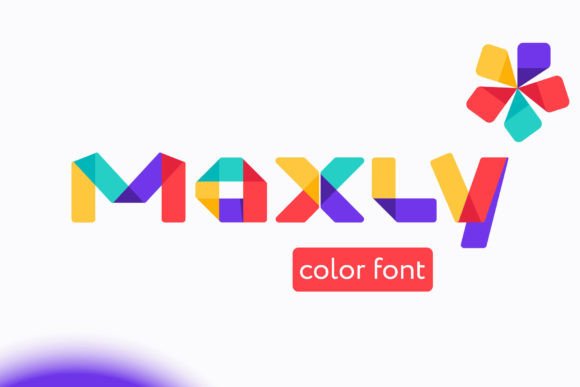
When you're working on a project that needs to grab attention immediately, the typeface you choose is your first and most powerful tool. Maxly is a creative font built for exactly those moments. It's a premium font in the truest sense—a bold, fun display color font that leverages modern typography to deliver visually striking results. As an OpenType-SVG font, Maxly isn't just a set of outlines; it contains rich color data within the font file itself, allowing you to create multi-color, textured text in a single click across compatible applications like Adobe Photoshop, Illustrator, and Silhouette Studio.
Understanding the Personality and Style of Maxly
Maxly's visual character is defined by its confident weight and playful energy. Each letterform is crafted to make a statement, featuring smooth curves and a substantial presence that ensures it stands out in any layout. The integrated color aspect means you're not just getting a bold shape, but a complete visual package with built-in gradients or solid color fills that add depth and dimension. This makes it an exceptionally versatile design asset for projects where flat, monochrome text just won't suffice.
Think of Maxly as the typeface equivalent of a spotlight. It's not designed for body copy or lengthy paragraphs; its strength lies in headlines, logos, and short, impactful phrases. Its personality aligns perfectly with brands that want to project confidence, creativity, and a sense of modern fun. Whether you're aiming for a youthful, energetic vibe or a sophisticated yet bold brand identity, Maxly provides the visual shorthand to achieve it. The font's inherent style helps establish visual hierarchy effortlessly, making key messages impossible to overlook.
Where Maxly Truly Shines: Practical Applications
The real-world value of a display font like Maxly is measured by its application. For entrepreneurs and small business owners, it's a game-changer for logo design. A logo set in Maxly immediately communicates a brand that is contemporary and unafraid to stand out. It works exceptionally well for boutique brands, creative agencies, lifestyle blogs, or any business targeting a design-savvy audience. The built-in color reduces the need for complex layering in logo files, simplifying your brand assets.
For marketers and content creators, Maxly excels in creating scroll-stopping social media graphics. Imagine a bold Instagram story headline or a Pinterest pin title that uses Maxly's colored text to match your campaign's palette perfectly. In editorial design, it can be used for pull quotes or chapter headings in a digital magazine, adding a burst of visual interest. For packaging design, especially for products like cosmetics, gourmet foods, or craft items, Maxly can make the product name or a key feature pop off the shelf, enhancing brand recognition and shelf appeal.
Crafters and hobbyists will find Maxly particularly useful for projects where personal touch meets professional polish. It's perfect for creating custom greeting cards, party invitations, or scrapbook titles that look store-bought. Its compatibility with Silhouette software makes it a favorite for vinyl decals and custom apparel designs. Remember, for physical crafting machines like Cricut, you'll need to verify the font format compatibility, as the OTF and TTF files of this product are not compatible with Cricut. Always check the Ultimate Font Guide for specifics on using color fonts.
Maximizing Impact with Maxly: Pairing and Readability
Using a bold display font effectively requires some strategic thinking. A key principle of font pairing is contrast. Because Maxly is a high-impact typeface, it pairs best with a simpler, more neutral companion. Consider pairing it with a clean sans serif font for body text or a minimalist serif font for a more traditional feel. This contrast allows Maxly to command attention without overwhelming the entire design, ensuring your visual hierarchy remains clear and your message is easily digestible.
Readability is another crucial consideration. While Maxly is designed for clarity at headline sizes, its effectiveness diminishes in long sentences or at very small point sizes. Test it at the scale you intend to use. For a web design banner, ensure the text is legible on both desktop and mobile screens. In print, like on a poster or flyer, check that the color details remain crisp. The goal is to use Maxly's strength—its bold, colorful presence—to enhance engagement, not to create a barrier to comprehension.
When evaluating if Maxly is the right fit for your project, ask yourself a few questions. Does my project's tone align with a fun, bold aesthetic? Am I using it for short-form, high-impact text? Do I need the efficiency and unique look of a color font? If you're working on a brand identity system, consider how Maxly will integrate with your other design assets and whether its style supports your long-term brand perception. For commercial use, always review the licensing to ensure it covers your intended applications, from digital ads to physical products.
Ultimately, Maxly is more than just a creative font; it's a specialized tool for making a visual impact. Its value lies in its ability to inject energy and professionalism into projects where typography is a central feature. By understanding its personality, applying it in the right contexts, and pairing it thoughtfully, you can leverage Maxly to create designs that are not only beautiful but also strategically effective in capturing and holding your audience's attention.